WorkBuddy
Overview
WorkBuddy is an AI agent desktop app covering daily office work, coding assistance, document processing, and multimodal tasks. It connects custom OpenAI-compatible models through a visual interface or a local config file, so TokenPlus can be used directly as a model source - giving you GPT, Claude, Gemini, DeepSeek, and more under a single key.
Installation
- Download the installer for your platform (Windows / macOS / Linux) from the WorkBuddy website
- Complete the install with the wizard and launch it for the first time (a config directory is created automatically)
- Click the avatar at the bottom left → Settings to open the model configuration page
Configure TokenPlus
Adding through the GUI is recommended: Settings → Model → + Add Model, choose "Custom / OpenAI Compatible" as the provider, and enter the TokenPlus chat/completions endpoint.
# WorkBuddy add model (custom API)
Provider    : Custom / OpenAI Compatible
Endpoint URL: https://tokenplus.net/v1/chat/completions
API KEY     : sk-your-TokenPlus-key
Model name  : e.g. gpt-4o, claude-sonnet-4-6 (as shown in the console)
Advanced    : enable tool calling / image input / reasoning mode as needed
 tip
WorkBuddy currently supports only the OpenAI SDK format (OpenAI-compatible protocol), not the native Anthropic format; however, the Claude interface that is OpenAI-compatible works fine.
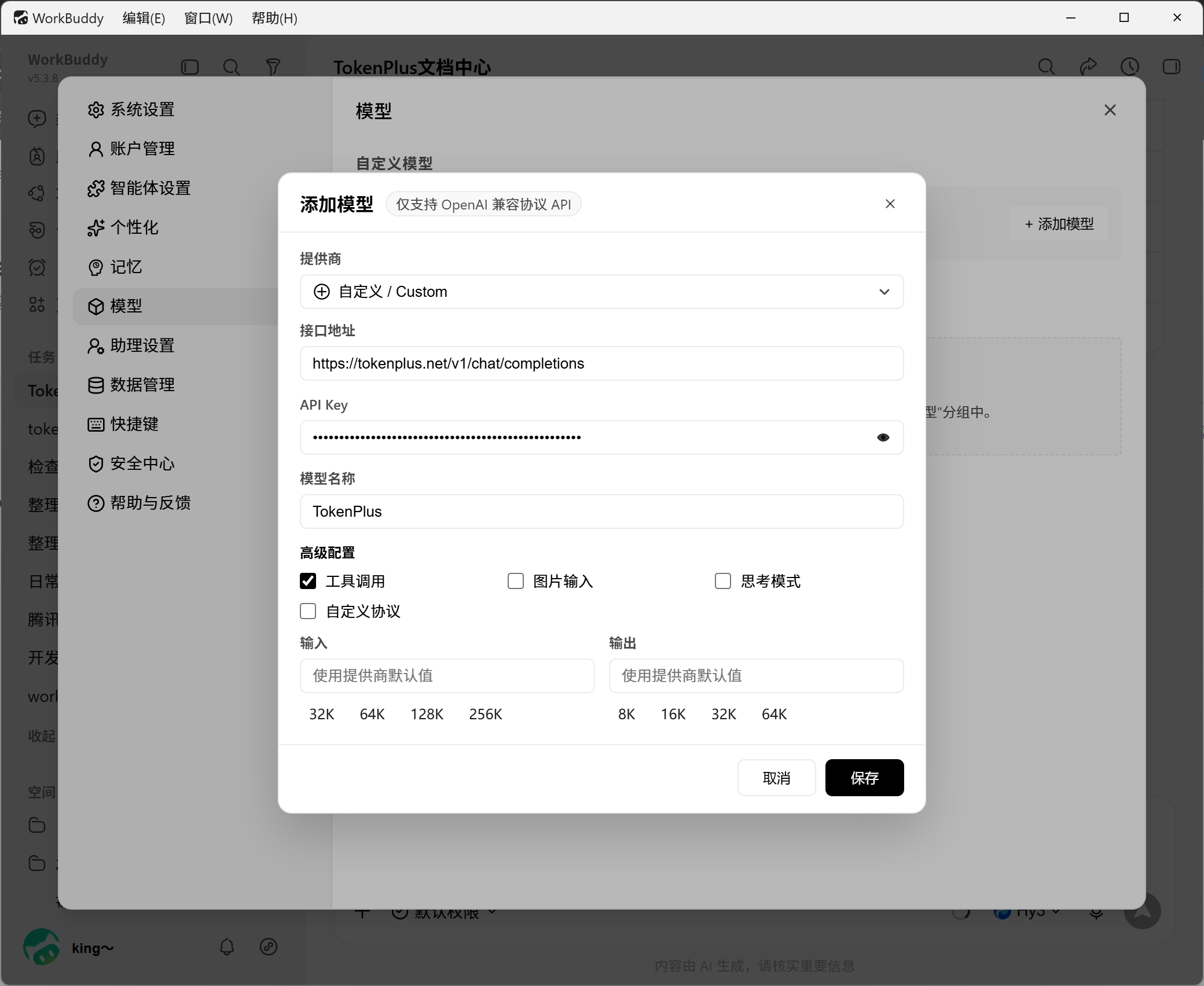
Quick start (up and running in 5 minutes)
- Open Settings → Model → + Add Model
- Choose Custom as the provider, set the endpoint URL to https://tokenplus.net/v1/chat/completions, and paste the key
- Enter the model name shown in the TokenPlus console and save
- Back on the main screen, pick the model under the "Custom Model" group at the bottom model selector to start chatting
FAQ
- Model not showing after saving? Fully restart WorkBuddy; the custom model appears under the "Custom Model" group at the bottom
- Getting 401? Check that the Key is complete, matches the endpoint URL, and has no leading or trailing spaces
- Does it support Claude / Gemini? Yes - just enter the corresponding model ID through TokenPlus's OpenAI-compatible endpoint